

Prepare a session in advance
Fill in the session file once, so the agent knows who carries out the erasure and how many passes to write, without typing it at each session.
The session file, exawipe.conf, holds the values a technician would otherwise type at each
session: who carries out the erasure, your organization's free fields, and the number of
overwrite passes. It sits on the USB stick, or on the reports key when you start from a CD.
The values are declarations. The agent writes them into the proof as they are, without checking what they say. The file can never choose the mode, the erasure method or the disks: those are decided at the boot menu and during the session.
Fill in the file
Let the agent write the file
Start one session from the stick. When the file is missing, the agent writes it, with a comment
above each value that explains it. In interactive mode, it then asks you for the values on the
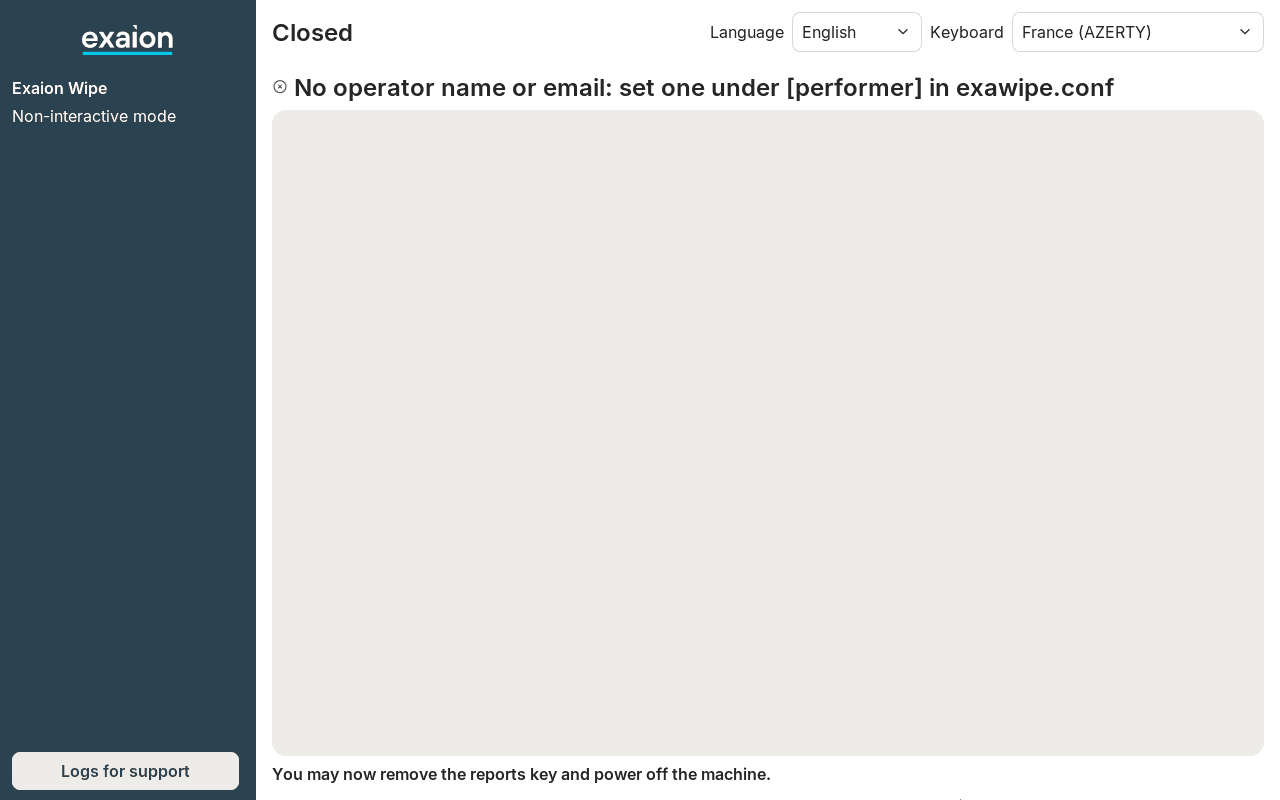
screen. In non-interactive mode, it stops before listing any disk with
No operator name or email: set one under [performer] in exawipe.conf. Nothing is erased.
Open the stick on a computer
Plug the stick into a Windows, macOS or Linux computer. It shows a drive named WipeReports.
Open exawipe.conf at its root with a plain text editor, such as Notepad, TextEdit or gedit.
Type the values
Type each value after the = of its line. Give at least a name or an email under
[performer]: a non-interactive session refuses to start without one. Leave a line empty after the
= for a value you do not want to give.
Save and eject
Save the file, then eject the drive before you unplug the stick. Every later session reads it. The agent never writes over the file once it exists.
A filled file looks like this:
[performer]
name = Jane Martin
title = Asset recovery technician
organization = Acme Services
location = Lyon warehouse
phone =
email = jane.martin@example.com

[fields]
Batch = B-2026-114

[overwrite]
passes = 1
The file holds names and email addresses in plain text. Keep the stick as you would keep a list of your technicians.
What the file holds
| Section | Values |
|---|---|
[performer] | The person carrying out the erasure: name, title (job title), organization, location (where the erasure takes place), phone, email. |
[fields] | Your organization's free fields, one label = value per line. |
[overwrite] | passes: 1 for one pass of zeroes, 3 for DoD 5220.22-M. Any other number, 0 included, gives three passes. It applies to magnetic disks only; flash media always get one pass. |
Free fields are labels your organization adds to its proofs, such as a batch or a contract number. When your organization's ISO defines them, the file lists them already and only those labels are taken. When it defines none, you may write up to four of your own. A label can only come from the ISO or the file: none can be added during the session.
During the session
Interactive mode. After you choose the recording profile, the agent shows
Person carrying out the erasure: with the six values from the file, then, when there are any,
the free fields under Free fields, declarative, not checked by the agent:. You can change any
value before confirming (Confirm the details on the screen, y on a console). What you type
is used for this session only: it is not saved in the file. The proof records the values you
confirmed. See An interactive session, step by step.
Non-interactive mode. The agent asks nothing and uses the file's values as they are. Without a name or an email, the session stops before listing any disk: see When no name or email is found.
The number of passes from the file holds unless you change it at the last confirmation before erasing, see How disks are erased.
When no name or email is found
In non-interactive mode, the session stops before listing any disk when it finds neither a name nor an email for the person carrying out the erasure. Nothing is erased. The message says where the agent looked, which is where to add one:
| Message | Where to add a name or an email |
|---|---|
No operator name or email: set one under [performer] in exawipe.conf | In the session file on the stick, see Fill in the file |
No operator name or email on the kernel command line: add exawipe.performer.name or .email | On the kernel command line, see Technical details |
No operator name or email in the file at the URL of exawipe.config: add one under [performer] | In the file the agent downloads |
No operator name or email: the session file at the URL of exawipe.config could not be fetched | In the file the agent downloads, once the download works: check the address and the network, see Technical details |
When a line is wrong
A mistake in the file never blocks an erasure. The agent skips the line it cannot use, keeps the rest, and shows one notice per problem on the first screen of the session, with the line number. For example:
exawipe.conf, line 12: unknown key, not taken.Check the line, correct the file on a computer, and start a new session. The agent reads the file once, at the start of the session.
Technical details
A non-interactive session
When to let the agent erase a machine without anyone at it, what to prepare, what the screens show, how to stop it and how to check the result.
How disks are erased
How the agent picks the erasure for each disk, which disks it refuses, what you accept at the confirmation screen, and how it checks the result.