

After the session
Where the proof goes at the end of a session, what the last lines on screen mean, and how to deliver a proof kept on the stick.
Once the disks are erased, the agent seals the proof of erasure and saves it on the USB stick,
in its reports partition, WipeReports. Only then does it send the proof to your organization's
portal. A proof that does not reach the portal is not lost: it stays on the stick, and you upload
it yourself.
What happens at the end
- The agent saves the proof on the stick, then the session's logs beside it.
- It sends the proof to the portal and waits for the portal's answer, then sends the logs.
- It shows the result on the screen and on every console.
The proof is always on the stick before anything is sent. If the stick was unplugged and plugged back in during the session, the agent finds it again and uses it.
Sending usually takes a few seconds. When the portal is slow or out of reach, the agent keeps
trying for up to 20 minutes. Meanwhile the Proof screen shows where the proof is and
Waiting for the portal's answer, up to 20 minutes; the proof is already on the key.
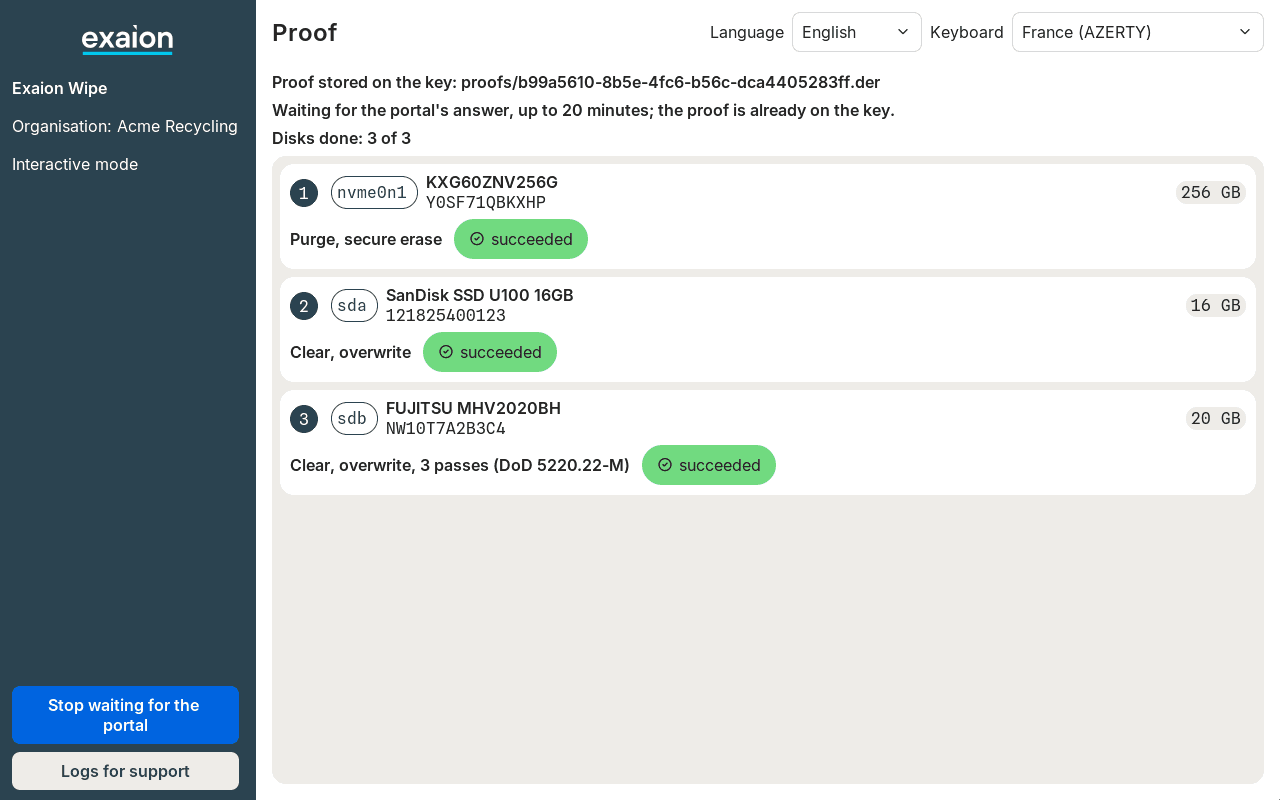
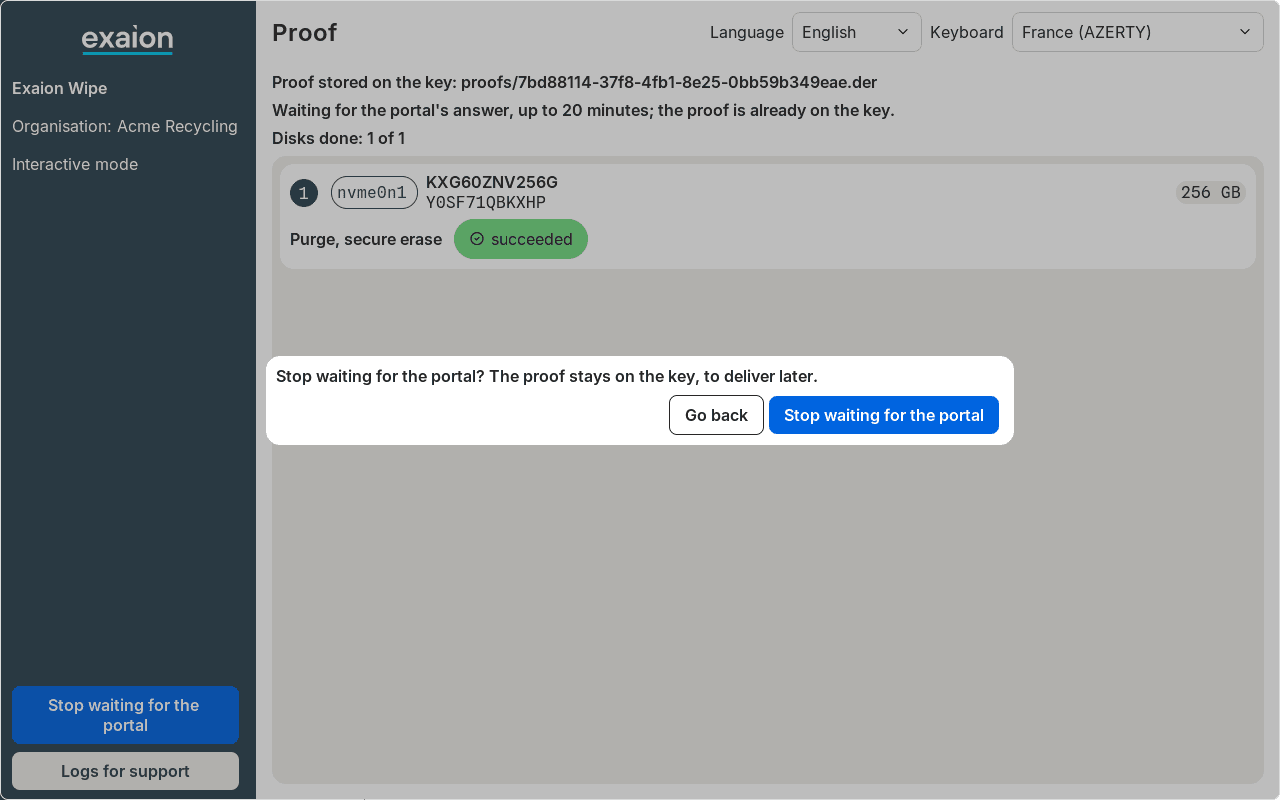
You do not have to wait. Click Stop waiting for the portal at the foot of the left column, then
confirm; on a console, type q. The proof stays on the stick, to upload later. Before
the proof is saved, there is nothing to stop: the button is not shown and q is refused.
To send the proof, the machine needs a wired network port that gets its address automatically (DHCP) and direct HTTPS access to the portal. The agent has no Wi-Fi and does not use a proxy. Without a network, the session still runs and the proof stays on the stick.
Read the result
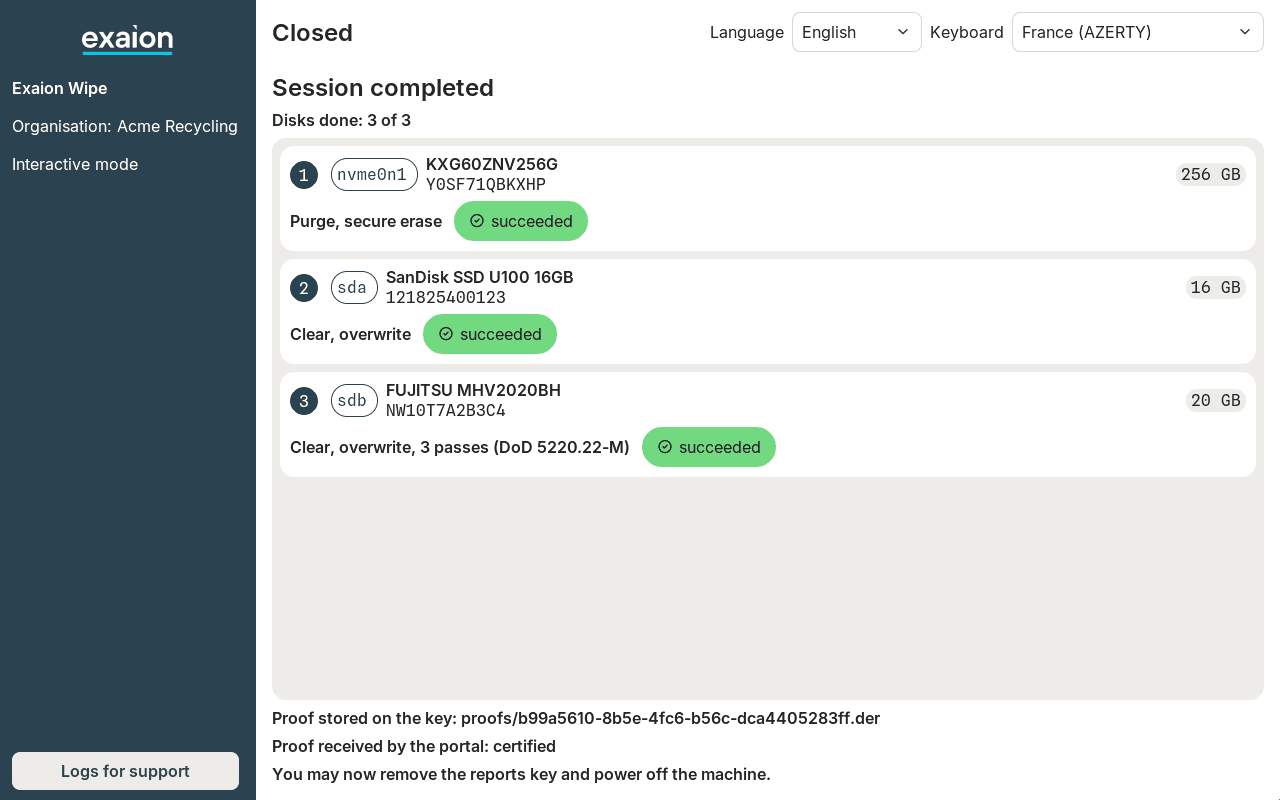
The closing screen, Closed, shows the outcome of the session, each disk's result, where the proof is, then what the portal said:
| Line on screen | What it means | What to do |
|---|---|---|
Proof stored on the key: proofs/<session>.der | The proof is saved on the stick. | Nothing. |
Proof received by the portal: <status>, for example Proof received by the portal: certified | The portal has the proof. The words at the end are its status. | Check the status on the portal: see Proof statuses. |
Proof refused by the portal: <reason>. Keep it on the key. | The portal refused the proof. The reason says why, and whom to ask when someone must act. | See Unblock a proof. Keep the proof on the stick. |
Proof not delivered: kept on the key for a later delivery | The proof did not reach the portal, or you stopped waiting for it. | Upload it. |
Proof kept on the key, to deliver to the portal later | The proof was not sent, by choice or because the portal was out of reach. | Upload it. |
When the portal has not given its final status within 10 minutes of receiving the proof, the
status shown is the last one it gave, usually being processed: check the final status on the
portal. Every status and reason the agent may show is listed under Portal answers.
The outcome of the session is the heading of the closing screen, or the line after the disk list on a console:
| Outcome | What it means |
|---|---|
Session completed | The proof is saved on the stick, whatever the portal answered. |
Session cancelled | The session was cancelled. Any proof is saved on the stick before the session closes. Cancelled before the erasure, the disks show the method that was planned, and no result. |
Proof lost, the agent stopped before a key took it: erase the disks again | The agent stopped before a stick took the proof. The proof is lost. |
No proof, an agent defect: send support the lone .logs.gz in proofs/, or a photo | The agent could not produce the proof. Contact support. |
A session refused before erasing shows the reason instead: see Troubleshooting.
Switch off and remove the stick
The agent never switches the machine off or restarts it. Remove the stick and switch off when the
closing screen ends with You may now remove the reports key and power off the machine.: the agent
has then written everything to the stick, the index included, and released it. Every closing
screen ends with this line, even when the session was refused before erasing.
If you ask for logs for support on the closing screen, this line is
replaced, while they are written, by
Do not remove the reports key yet: the logs for support are being written. Wait until it comes
back.
Never switch off before that line. If the stick is missing or cannot be written when the proof is saved, the agent keeps the proof in memory and shows one of these lines:
| Line on screen | What to do |
|---|---|
Proof not stored, do not power off: plug in a reports key, the proof is written to it | Plug the stick, or another reports key, back in. |
Proof not written on the reports key, do not power off: plug in another reports key | Plug in another reports key. |
The agent tries again every 5 seconds. As soon as a key takes the proof, the line goes and the session ends as usual. Switching off before that loses the proof.
Deliver a proof kept on the stick
The agent sends only the proof of the current session. A proof left on the stick is never sent again by a later session: upload it from the portal.
Plug the stick into a computer
Use a Windows, macOS or Linux computer: the stick shows a drive named WipeReports.
Find the proofs not yet delivered
Open proofs/index.txt with any text editor. Each line names one proof and ends with its
status. A line ending in stored is a proof the portal does not have: upload it. On the other
lines, the portal has answered: check the proof's status on the portal.
Upload them
Upload the matching .der files from the Upload proofs card of the portal's Proofs
page: see Upload proofs. They show the source MANUAL, where proofs sent by the
agent show AGENT.
Eject the stick
Eject the drive before unplugging it.
Upload a proof in your own organization's portal: a proof produced for another organization is refused.
What the stick holds
Each session adds files under proofs/, named after the session's identifier. The full list is
on The reports key.
Logs for support, asked for or written after the agent stopped on an error, are in support/: see Contact support.
Never delete a proof from the stick, nor a file ending in .tmp, unless the agent lists its
session as safe to delete (see When the stick is full). Even a proof the portal
refused may have its only intact copy there, and after a power cut a .der.tmp file may be the
only trace of a proof.
The proof itself is encrypted for the portal. The session file exawipe.conf (with the
operator's name and email), the logs and the index are readable by anyone holding the stick.
When the stick is full
The agent keeps room on the stick for the proof of the session in progress, so a long session cannot run out of room at the end. It needs about 23 MB free; a proof itself weighs a few tens of kB.
- From the first screen to the confirmation, a stick short of room shows a warning,
Not enough free space on the reports key: free some or plug in another key, with the sessions you may delete. - The confirmation screen gives the figures,
Reports key: <free> MB free, <needed> MB needed for this session, then saysNot enough space on the reports key: the session will stop before erasing anything unless space is freed or another key is plugged in. - The session can still be confirmed. After the 60-second countdown and the preparation, before
touching any disk, the agent stops it with
Reports key too full, nothing erased: free space on it or plug in another key, followed by the space free, needed and to free. Nothing is erased. Heed the warning before you confirm.
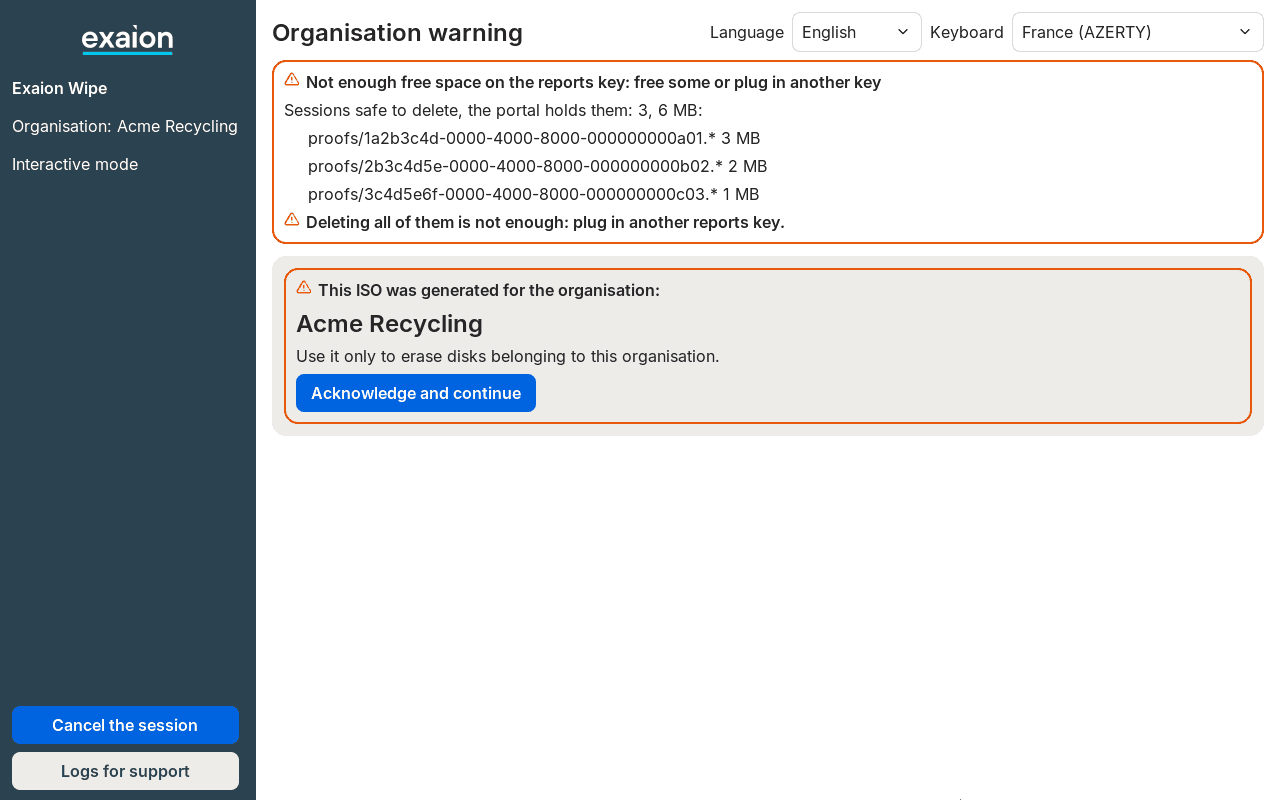
With the warning and the refusal, the agent lists the sessions the portal already holds, which you may delete:
Sessions safe to delete, the portal holds them: 3, 6 MB:
   proofs/1a2b3c4d-0000-4000-8000-000000000a01.* 3 MB
   proofs/2b3c4d5e-0000-4000-8000-000000000b02.* 2 MB
   proofs/3c4d5e6f-0000-4000-8000-000000000c03.* 1 MB
Deleting all of them is not enough: plug in another reports key.
On a computer, delete the files of each listed session: every file in proofs/ whose name
starts with that session's identifier. Delete nothing else in proofs/. When deleting them all
would not free enough room, the agent says so with the last line above. Then, or when it shows
No proof on the key is safe to delete: use another key, use another reports key, or delete files
you put on the stick yourself.
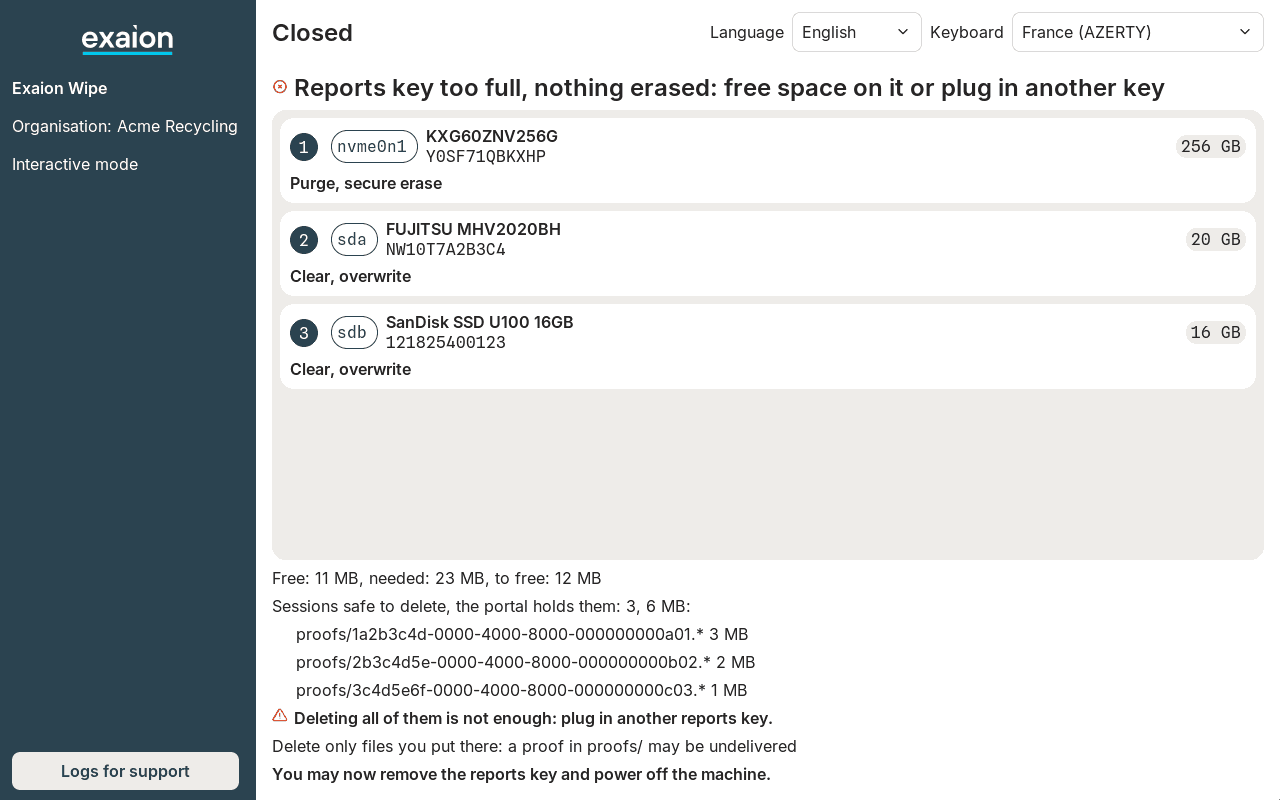
The agent itself deletes nothing. It shows: Delete only files you put there: a proof in proofs/ may be undelivered.
Licenses
Each disk erased with success uses one license, whatever the machine. A failed disk uses none. Licenses are used when the portal issues the certificate, not when the proof arrives. See How licenses work.